Practical AI applications to boost online store performance
AI earns its keep when you point it at a specific problem: a support inbox that never empties, bestsellers that keep running out, or product pages that don't convert. For merchants handling 100 to 1,000 orders a month, that's where it helps you keep up with the big retailers. McKinsey's research shows AI is already changing how European retailers compete, from customer service to fulfilment.
It's not magic, though. AI tools need clean store data, clear limits, and a person keeping an eye on them. Worrying about setup costs, made-up answers, and compliance is fair. The way around it is to start small: one tool, one problem, and numbers to measure it against.
Personalised product recommendations
A generic online store shows every visitor the same products. AI personalisation changes what each visitor sees based on what they browse, search for, and have bought before.
Instead of fixed rules you set by hand, machine learning spots patterns in shopper behaviour to suggest matching items, better search results, and personalised discounts. The easiest place to start is a recommendation block on product pages or in the cart, where it lifts average order value.
If you sell on WooCommerce, Ladu Revenue Boost does this with AI models trained on your own order history. It creates cross-sells for every product based on what your customers actually buy together, and suggests higher-value upsells wherever there's a fit, not just for your bestsellers. Every suggestion comes with the reason behind it, so you check it before it goes live and publish one at a time or across your whole range. Suggestions update as products sell out or new ones arrive, so you're not stuck with related products someone linked by hand two years ago.
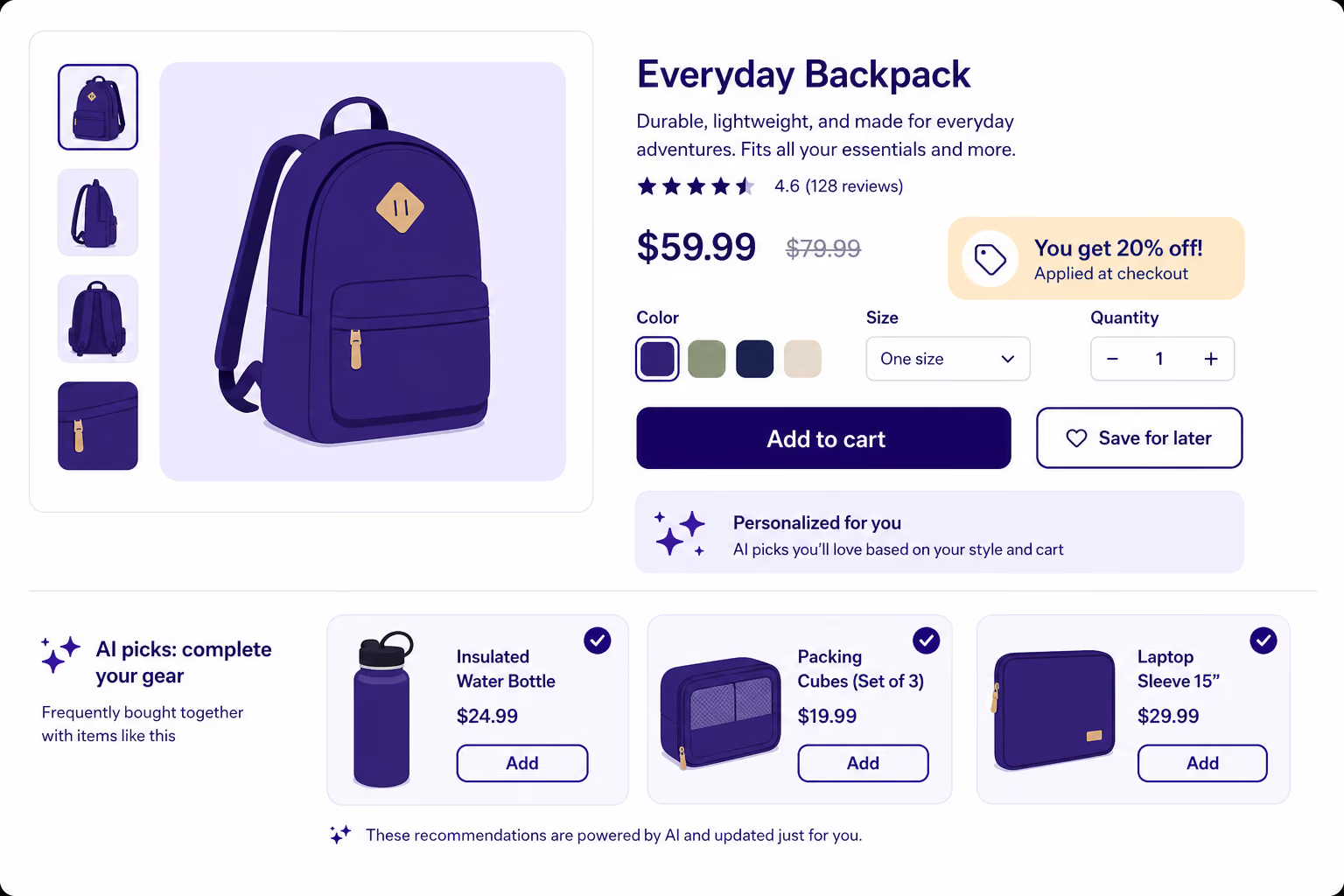
Keep it simple. Suggesting a matching accessory at checkout, or products related to what someone just browsed, usually beats complex segmentation. For more on layout and conversions, see our guide to ecommerce website optimisation.
Key takeaway: Start on product pages and in the cart, where customers are closest to buying. Test against a group that doesn't see personalised suggestions, so you know the lift in average order value is real.
Chatbots for customer support
If your team spends hours answering the same questions about order tracking, delivery times, and sizing, that's time and money you could spend elsewhere. An AI chatbot answers routine questions around the clock, so customers get help before they give up.
Today's chatbots don't need rigid scripts. Train one on your store's help pages and policies, and it understands questions in the customer's own words, suggests products, and checks order status. Quick answers reduce cart abandonment, especially at peak times. The next step is AI agents that shop on the customer's behalf, covered in our guide to agentic ecommerce.
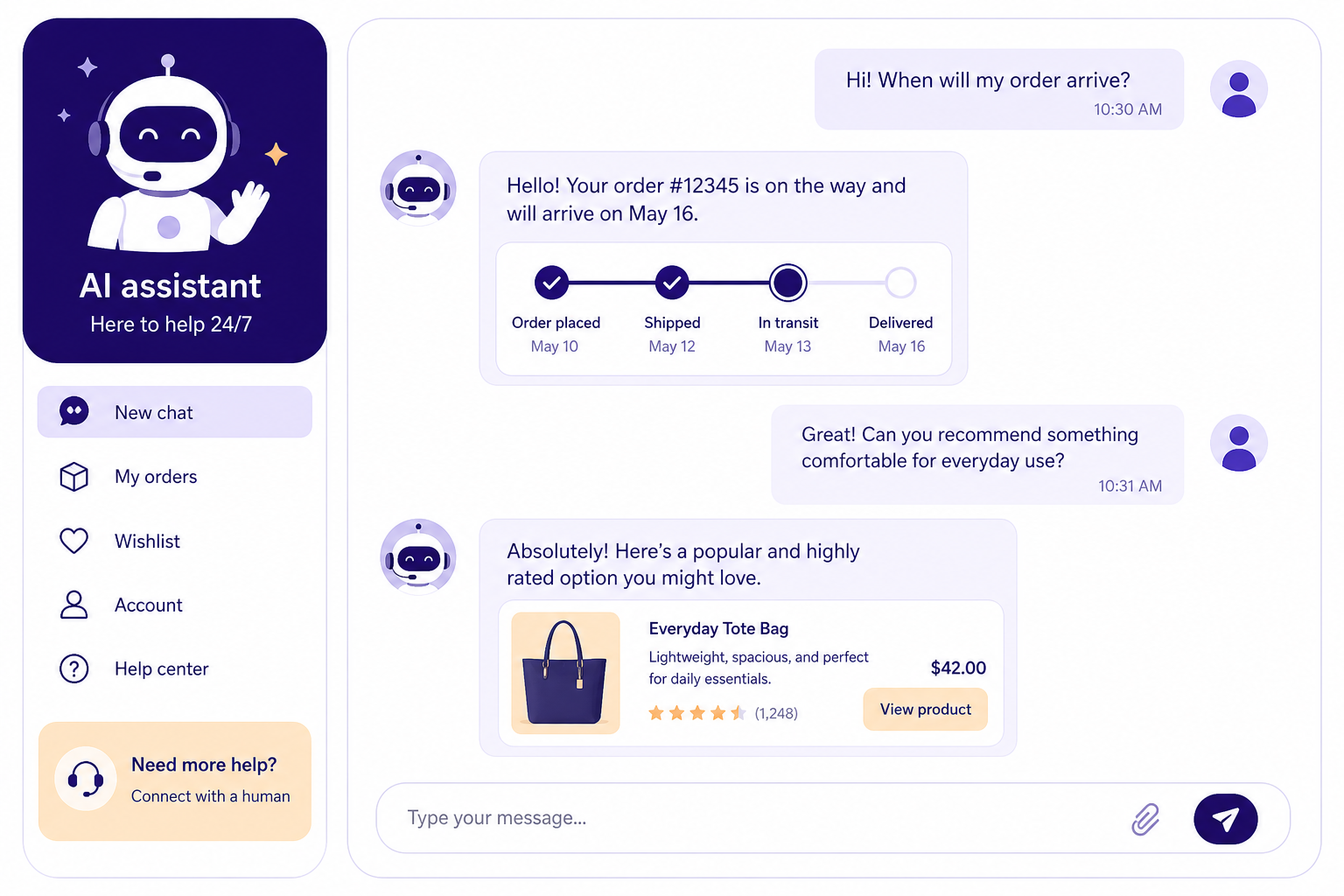
Set it up in a quiet season, so you can train and test it before the rush. For more ideas on using quieter months, see our online store strategies for a slow summer.
One rule to know upfront: under EU AI Act Article 50, you need to tell customers they're talking to an automated system before or at the start of the conversation.
Demand forecasting and stock control
Too much stock ties up cash. Too little means lost sales and unhappy customers. If you restock from a spreadsheet and memory, a sudden sales spike is hard to plan for.
Machine learning models look at your past orders, seasonal patterns, price changes, and local trends to predict demand for each SKU 30 to 90 days ahead. That helps you keep stock lean without running out of what sells.
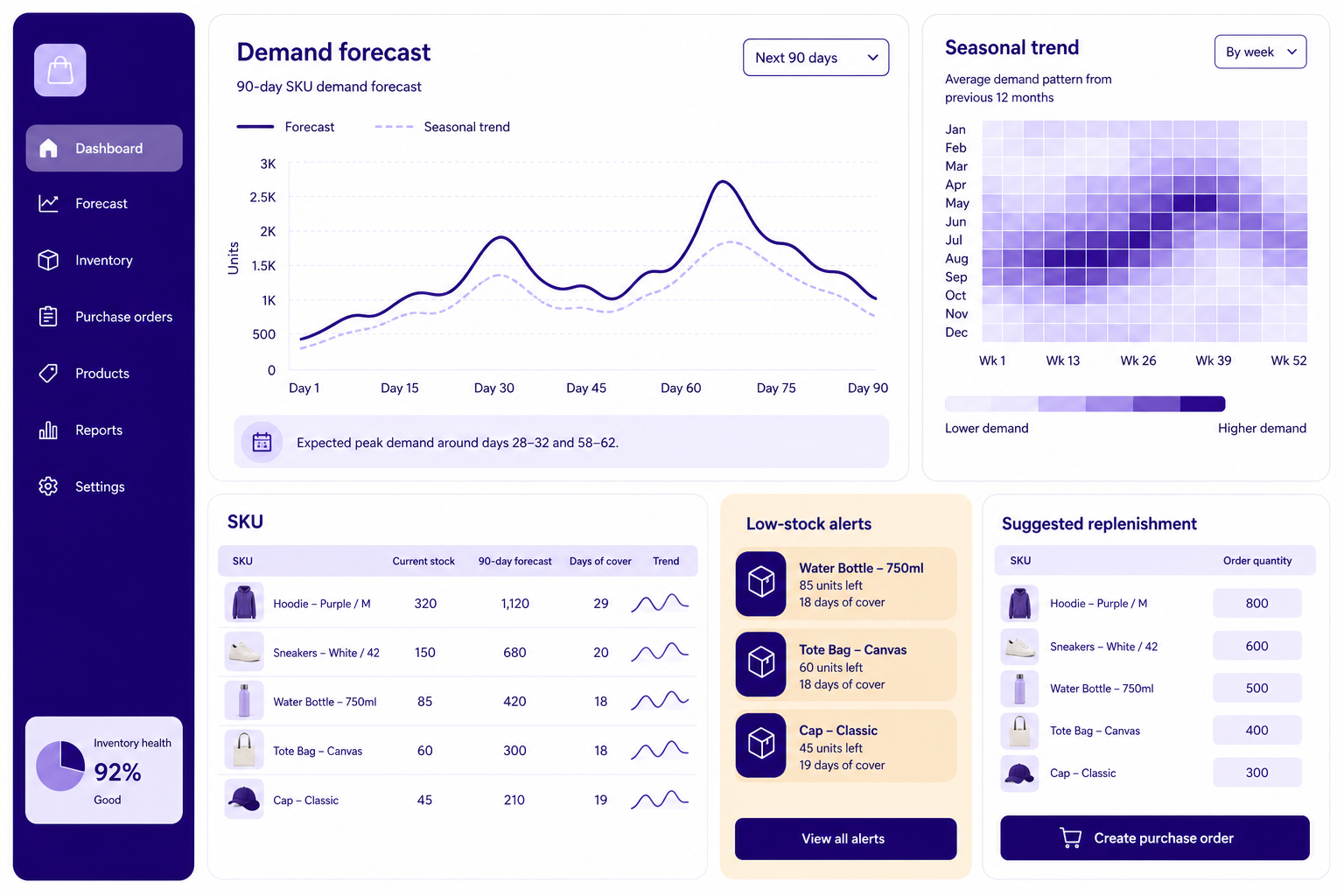
Don't replace your whole setup at once. Test forecasting on your top 20% of SKUs by revenue, and compare its predictions with real sales for a few weeks before you trust its restock suggestions.
Dedicated forecasting platforms do this well, but they're priced for bigger operations. Inventory Planner by Sage publishes one price, $119.99/month for a Shopify-only, single-warehouse plan. Its full plans are quoted based on your revenue, with reported starting points around $245/month. Netstock starts at $900/month on an annual contract and typically takes 6–10 weeks to set up. Slimstock's Slim4 is quote-only and rolled out with its consultants. The other route is an ERP with an inventory module, which means licence fees, a setup project, and far more software than most small stores will use.
If you don't need to go that far, Ladu by Montonio covers the stock control a growing WooCommerce store needs, starting at just €29/month. It tracks how fast each product sells and warns you before you run out, ranking alerts by revenue at risk so the most urgent restocks come first. Alerts take pending orders and incoming stock into account, and you can turn them into purchase orders in a few clicks. Ladu also flags dead stock, ranked by the cash tied up rather than by unit count, so you know what to discount or stop reordering. When orders come in, mobile pick lists help you pick and pack them without mistakes.
Product content and backend automation
Writing product descriptions, ad copy for each language, and search metadata by hand takes hours. Generative AI can draft them from your spec sheets in minutes.
Someone still needs to check the result. AI can get facts wrong or drift from your brand voice, and a wrong product description misleads customers. Have a person review anything customer-facing before it goes live.
Behind the scenes, AI works best alongside the right integrations. Together they take a lot of manual work out of fulfilment:
- Send customers automatic order status and shipping updates
- Create shipping labels faster with Montonio label management
- Issue refunds straight from your store admin with Montonio Refunds, so fewer customers need to contact support
- Connect a custom platform to payments and shipping through our Custom API
Deloitte gives the same advice: judge each generative AI tool by the specific job it does, and whether it pays for itself.
Which use case fits your store
The right starting point depends on where your store gets stuck and how much technical help you have.
How to run a low-risk AI pilot
AI without clear limits can blow your budget and disrupt how you work. A simple pilot keeps it under control:
- Find the manual bottlenecks in your store, and clean up your product data
- Pick one clear use case, like answering your top customer questions automatically
- Record baseline metrics such as conversion rate, response time, and stock turnover before you launch
- Run the AI tool next to your current process for a few weeks to check its accuracy
- Keep a person in charge of high-risk commitments, money decisions, and customer messages
A tight scope shows you whether the tool pays off before you roll it out across your catalogue or marketing channels.
EU rules to know before you start
Any AI tool that handles customer data must follow GDPR. That means using data only for the purpose you collected it for, collecting as little as you need, and not profiling customers with fully automated decisions without their explicit consent. Make sure your AI vendors sign a data processing agreement and don't train their models on your customers' personal data.
EU rules for online stores keep changing, like the new mandatory withdrawal button, so keep an eye on what's coming to avoid fines.
Your first AI project
You don't need to automate everything at once. Start with one specific problem: slow support replies, bestsellers running out, or a low average order value.
AI works best on top of solid basics, meaning a checkout, shipping, and payment setup that already works without manual fixes. So look at how your store is doing, find the one delay that costs you most, and run a small AI pilot with a person keeping watch.